
经过一段时间的努力,NClay框架终于到了可以见人的阶段了,为了让大家了解NClay,于是基于NClay编写了一个SmallBlog程序作为介绍案例。在开发SmallBlog过程中,刚好VS 2008 beta 2中文版发布,看到她的特性后发现能进一步提高NClay的开发效率,于是就用VS 2008结合NClay进行SmallBlog的编写。
NClay的结构
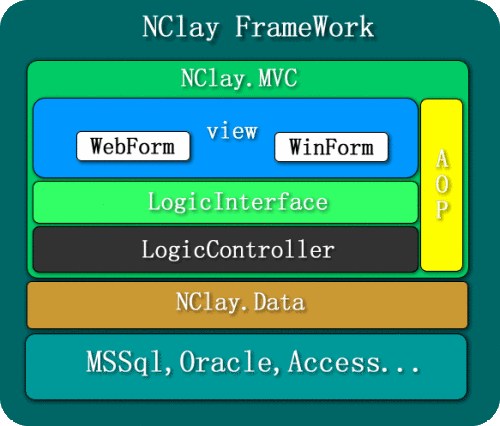
图1
SmallBlog
SmallBlog是一个简单的个人博客程序,从SmallBlog中大家可以了解到NClay的ORM,MVC和AOP等功能的应用,下面通过SmallBlog的代码来了解NClay的处理结果。
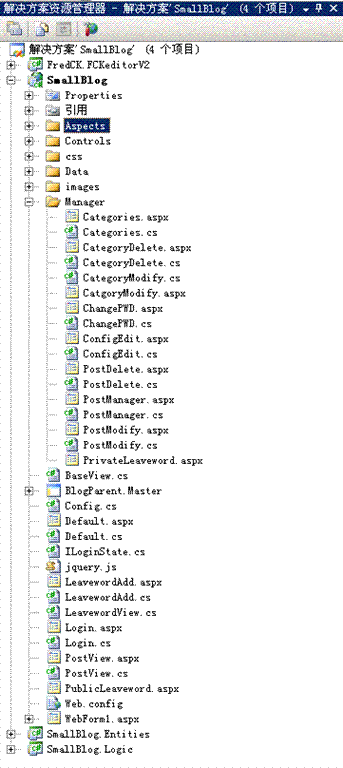
程序结构
498)this.style.width=498;">
图2
程序主要分为三大部分:
实体层:SmallBlog.Entities用于各层进行数据交换的基础介体。逻辑层:SmallBlog.Logic用于处理各种输入和输出逻辑表现层:SmallBlog用于信息的输出和信息输入。
实体的定义
实体的是程序和数据结构的映射描述,也是NClay.Data进行数据操作的依赖结构。
/// /// DBModel.Table///
[Serializable][NClay.Data.Mappings.TableMapper("Category")]
public partial class Category{ public Category () {//// TODO: 在此处添加构造函数逻辑// } ** string mCategoryID;/// /// varchar///
[NClay.Data.Mappings.PrimaryKey("CategoryID")]public string CategoryID{ get {return mCategoryID; } set {mCategoryID= value; }}
业务逻辑
NClay的原则是所有逻辑处理必须以接口的方式体现,所以在设计阶段必须构造业务输出和输入的逻辑接口。
public interface ICategoryDelete{ string CategoryID {get;set; }}
public void Delete(ICategoryDelete logic){ if (!NClay.Common.IsEmpty(logic.CategoryID)) {if ((DB.Post.CategoryID == logic.CategoryID).CountOf() > 0){ throw new LogicException("有文章在此类别中不能删除!");}(DB.Category.CategoryID == logic.CategoryID).Delete(); }}
VS 2008对代码的感知支持有所提高,编辑器能直接感知到表达式所返回的类型:
498)this.style.width=498;">图3
视图
由于VS 2008对默认属性的支持,这样大大减少了NClay下的视图代码;在VS 2005里,不得不对编辑器生成的接口代码进行调整。而VS 2008下直接编辑生成接口代码就可以,省了不少修改的工作。
[NClay.MVC.Action(ActionType = NClay.MVC.ActionType.All,
Tag = "~/Default.aspx", Services = new Type[] {
typeof(Logic.Post.IPostView) })]
public class Default :BaseView ,Logic.Post.IPostView{ #region IPostView 成员
public string CategoryID { get; set; }
public System.Collections.Generic.IList Posts { get; set; }
#endregion #region IDataPageProperty 成员 [NClay.MVC.Bind(typeof(NClay.DataPage))] public NClay.IDataPage DataPage { get; set; } #endregion}
AOP扩展
很多时候面对多个视图处理同样的逻辑,这时候可以借助于框架的AOP功能完成。以下是统一处理页面左侧的功能。
[NClay.MVC.ViewAspect(NClay.MVC.AspectLevel.High)]
public class AspectBaseView:NClay.MVC.IAspect{ #region IAspect 成员 public void Aspect(object source, NClay.MVC.AspectHandler e) {if (source is BaseView){ BaseView bv = (BaseView)source; NClay.MVC.Container.Execute(bv, true); NClay.MVC.Container.Execute(bv, true); NClay.MVC.Container.Execute(bv, true);}e.Execute(source); } #endregion}
为了避免加载重复的数据,可以通过AOP来实现逻辑数据的缓存处理。
[NClay.MVC.LogicAspect(typeof(Logic.SysUser.IBlogConfig),typeof(Logic.SysUser.IEditUserInfo))]
public class BlogConfigCache : NClay.MVC.IAspect{ #region IAspect 成员
public void Aspect(object source, NClay.MVC.AspectHandler e) {if (source is Logic.SysUser.IBlogConfig){ Logic.SysUser.IBlogConfig config = (Logic.SysUser.IBlogConfig)source; config.OwnerConfig = CacheUnit.GetBlogConfig(); if (config.OwnerConfig == null) {e.Execute(source);CacheUnit.SetBlogConfig(config.OwnerConfig); }}if (source is Logic.SysUser.IEditUserInfo){ e.Execute(source); CacheUnit.ClearBlogConfig();} } #endregion}
程序运行效果图
498)this.style.width=498;">图4


